Tuesday, 4 August 2015

Batch Script - Windows Privilege Escalation


While working on Windows privilege escalation, we need to gather as much system information as we can, so just thought to club all important windows commands into a batch file which will generate system information all at a once, and later we can analyse this to identify potential privilege escalation entry points.

Download

Hope this helps!

Regards,
eXpl0i13r

Sunday, 14 June 2015

Root Samsung note 10.1 N8000 and Installing Kali Linux on android tab


Finally I rooted my Samsung Galaxy Note 10.1 N8000!!

Here are simple steps and handy links :

http://www.android.gs/root-galaxy-note-10-1-n8000-n8010-n8013-n8020-cf-auto-root/


1. Install Samsung Kies from  : Samsung Kies
2. Download ODIN and necessary files for rooting from :

CF-Auto-Root
ODIN-3.07


3. Start ODIN
4. Restart TAB and press Volume Down + Power Button
5. While in download mode connect TAB to Laptop through USB.
6. Click on PDA and select root file : "CF-Auto-Root-p4noterf-p4noterfx-gtn8000.tar.md5"
7. Click on Start button and restart TAB
8. That's it Note 8000 is now rooted!

My aim was to install Kali Linux on N8000 Tab.

Steps:

1. Download Kali Linux for ARM : here
2. Copy file in wherever convenient , I copied this file at /sdcard/kali.img.gz
3. It is important to decompress is and copy this file on tab, if not then
    a  Install "ConnectBot" - Connecting to your Table over SSH
    b. Install "busybox" apk on rooted android tablet - as we need to use "gunzip" command
    c. "gunzip kali.img.gz"  - Decompress Kali Image
4. I tried installing "Kali.img" using  "Complete Linux Installed" but unfortunately when we import       Kali.img file this tool crashes.
5. Install "Linux Deploy" on rooted android
6. Install "androidVNC" on rooted device
7. Install "Terminal Emulator" on rooted device


Configure Installation Path = Kali.img path

Once you start instance - SSH will start 

After Connecting to Kali Instance using tightvnc


Brand New Kali Instance on N8000 - Samsung Note 10.1


It was fun installing and using Kali instance on N8000.
Hope this will be helpful.


Regards,
eXpl0i13


Saturday, 11 April 2015

WPA2 Enterprise Credential Capture using Freeradius server


In previous article we configured Fake radius server on Kali Linux which will be used to capture domain credentials of endpoints connected to WPA2 MGT [ WPA2 Enterprise Wi-Fi Access Points ]


Steps :

1. Attacker will setup Freeradius server on Kali Linux.
2. Enumerated clients connected to WPA2 Enterprise Wi-Fi Access point :


3. De-authenticated  client connected to WPA2 Enterprise Wi-Fi


4. Client connected to nearest WPA2 Enterprise Access point [ Attackers Fake Access Point ] 


5. Credentials captured while client authenticated with access point using domain credentials

6. Credentials captured are bruteforced using custom made dictionary with the help of asleap tool.


Game Over!....Now you can authenticate with WPA2 Enterprise access point using these credentials.
If MAC address authentication is enabled its very easy to spoof mac using "macchanger" tool.

Ex.
macchanger --mac MACADDRESS wlan0


Hope this is helpful.

Regards,
eXpl0i13r


Tuesday, 13 January 2015

Nullcon CTF 2015 Write up - Length Extension Attack [ Web 400 ]


Hi,

It was fun playing Nullcon CTF 2015 challenges, and learnt lot of things over 2 days!
One of the challenge consist of interesting crypto attack known as "Length Extension Attack"


Referring this diagram from Wikipedia  :  http://en.wikipedia.org/wiki/Message_authentication_code


MAC.svg


1. Sender has "Hash" i.e MAC & Message which will be sent to server.
2. Receiver receives MAC and Message
3. Receiver passes Message + Secret Key to algorithm = MAC
4. Receiver Compares new generated MAC with MAC received from Sender if matches message is authentic.


Nullcon pass at 10999 Rs


If you observe source code it has information  - Hash + Message + Length of Secrete key (19)


Pass above information to Hashpum tool which will perform Length Extension Attack to generate new hash to buy our product in 0 Rs. by appending |0

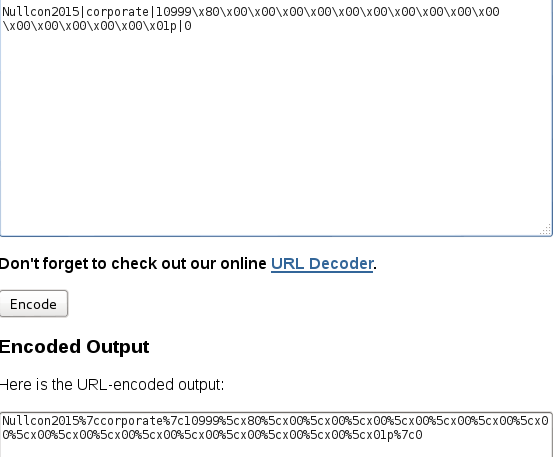
Message Format = Nullcon2015|Corporate|10999 i.e price


URL Encode new generated message from Hashpump and remove unnecessary characters "5cx"


Tamper data will show original Message & Hash


Tamper original Message and Hash with updated Hash and URL Encoded message


Forward HTTP request and That's It!.. You bought Nullcon Pass for 0 Rs.


This was interesting challenge and thought to post here on blog although CTF writ up is being published on official NullCon Site..


It was fun playing this CTF...and wish to learn more things going ahead!.

Regards,
eXpl0i13r

Saturday, 20 December 2014

Malware Analysis of very basic EXE file


Hi,

Going one step ahead we will start with analyzing simple EXE file and lets figure out what this is all about.


For the moment, very basic thing to understand about compiling, linking you can refer below diagram:


1. Source code written in computer language [ C,C++ ] is present in Source Code file which we save it as .c, .cpp
2. Compiler job is to take this file as input and create Object Code file.
3. Linker job is to add references to external Library Files include those in code and create executable.


In order to reduce programmers work of wring code to get basic functionality, Library files are created.

Ex. You would not want to rewrite code in C programming language for creating a process, creating a file, creating a service etc. for which Microsoft has already created DLL files containing functions which can be imported by programmer and will be used to perform the same tasks.


Every executable contains multiple function call, library imports and we will shortly analyse those in order to conclude that file is performing some malicious activities.


Lets start with a sample .exe file "mfc7sys.exe" which I think is a suspicious file by looking at task manager.


By Looking at process explorer we will get path / registry locations


Lets go ahead and check what's there at registry location and directory path :


Looking at above screenshots its clear that this programs entry is present in registry "RUN" means this program will start at boot.

There are 2 files, exe and dll, it seems EXE is using "mfc7sys.dll" file for XYZ functionality which is yet to explorer.


Now its clear that program is trying to receive keyboard inputs, using "SetWindowsHookEx" and which is most popular way of keyloggers and spywares.


Looking at above screenshots you will see program is using create file, copy file, write file calls and now purpose of this program seems clear that its a type of Keylogger.


Taking closer look at process monitor you will observe txt file created with same process name.
"mfc7sys.txt"


Captured keystrokes are stored in this text file :


We can also perform simple string analysis of this "mfc7sys.dll" and result is same :


Hope this article is helpful.

Regards,
eXpl0i13r


Detecting Simple UPX Packed EXEs with PEiD


Hi,

Packed programs are obfuscated programs containing malicious programs compressed inside it.
There are lot of programs out but lets start with basic where we can pack a program and how we can go ahead with detecting such packers with very basic tools available.


So simply I have packed string.exe program wit UPX packer which is very famous and freely available, and on right side with PEiD we can detect that program is packed which is helpful in malware analysis.

Regards,
eXpl0i13r

Sunday, 23 November 2014

CM Security App Lock Bypass on Samsung Galaxy Grand Prime


Hi,

In Samsung galaxy grand prime, there is setting called "Ultra Power Saving Mode"
which will save your battery by utilizing minimum application on your android phones.

This option is specific to Samsung new smartphones.

If you have installed CM Security App Lock to lock your Whats-app/Facebook messages you are at Risk!


1. Samsung Phone with Ultra Power Saving Mode
2. CM Security APP lock must be installed on android device
3. Open Ultra Power Saving Mode from Settings and Enable this functionality.
4. As soon as you enable this functionality Android device will only start selected applications Ex. Browser/Call/SMS
5. There is option to add WhatsApp/Facebook App, you can add WhatsApp and thats it!, you can access private messages locked with CM Security App Lock

This is because when you put your android device in Ultra Power Saving Mode, all processes apart from selected once are closed, and CM Security App Lock process is one of them :)


Displaying Screenshot_2014-11-23-18-58-44.png


Displaying Screenshot_2014-11-23-18-59-07.png


Displaying Screenshot_2014-11-23-18-59-12.png

Access to Whats App Messages


Regards,
eXpl0i13r