Saturday, 31 May 2014

Setting up Freeradius Server on Kali Linux

Hi,

The FreeRADIUS Server is a daemon for unix and unix like operating systems which allows one to set up a radius protocol server, which can be used for Authentication and Accounting various types of network access. To use the server, you also need a correctly setup client which will talk to it, including terminal servers, Ethernet Switches, Wireless Access Points or a PC with appropriate software which emulates it.

For more information Visit : http://wiki.freeradius.org/guide/faq

Installing FreeRADIUS server was easy on using 
apt-get install Freeradius*


FreeRadius Server Version Information :


Navigate to /etc/freeradius/radiusd.conf and edit below mentioned parameters for specifying IP Address at 2 Locations :


Specify Clients IP Range in my case (192.168.4.0/24) with secret = password which will be usedby Access Point to authenticate with Radius server.


Now we need to add Credentials for our Clients in users file as mentioned below :
( In my case I have created User with name eXpl0i13r which will be used by client laptops to authenticate with Radius server)


Configure EAP Type to PEAP in /etc/freeradius/eap.conf as mentioned below :


Now time to start our Radius Server with command : freeradius -X


Radius Server Successfully Started on below mentioned Ports:


Configure Access Point to connect with Radius Server :


Access Points Connected to our Radius Server :


Configuring PEAP on client Machine :


Configuring Advanced Settings as mentioned below :


It will Ask for Credentials configured in Users file.


eXpl0i13r User connected to our Radius Server and we can see details about it :


That's It.. You are now connected to Access Point!...
I hope this will help on setting up Radius Server.

Regards,
eXpl0i13r


Wireless Enterprise Authentication


Hi,

As I worked on few Wireless Penetration Testing assignments recently, I thought to post information related to Enterprise Authentication.
As we all are aware WEP is Broken Beyond Repair, and WPA/WPA2 Bruteforce handshakes!

But most of organizations implement WAP/WAP2 Enterprise Authenticataion, containing Domain Authentication, so ideally Wireless Client will authenticate to AP using Domain Credentials!

To capture Authentication Handshakes for Enterprise networks and bruteforce them we need Freeradius-WPE (Wireless Pawn-age Edition)

Basic Structure of Wireless Enterprise Network ( Using Radius Server) :

Tutorial - Geier E - 1051 - Figure 1.png


So attacker can bring Physical Access point which will be connected to Freeradius server hosted in Attacker's Virtual Machine as mentioned below :


Attacker broadcast SSID with similar name as official SSID of Access Point.
When Client connects to attackers rogue AP, It will send Authentication challenges which attacker can bruteforce offline to recover passwords.

This is just a theory on how attacker can work towards breaking Enterprise Level authentication.
In next post I will post about setup and configuration of Freeradius server, and slowly towards hacking enterprise authentications.

Regards,
eXpl0i13r

Tuesday, 13 May 2014

HP Data Protector Remote command execution Space Limitation

HP Data Protector < A.06.20 affected by Multiple Vulnerabilities including Remote command execution, which is very critical.

There are 2 different Metasploit Modules 

Windows --> auxiliary/admin/hp/hp_data_protector_cmd
Linux       --> exploit/linux/misc/hp_data_protector_cmd_exec

As I wanted to execute this exploit on Windows Environment there was some challenge, as I was able to execute any specific file, but was not able to pass Argument to it.

Little Challenges :
1. Specifying Executable Path
2. Execute commands with parameters


Correct Way to specify Path for executable file :


So by using \\ we can specify exact executable path.
But hang on!.....What If i want to specify "net user" command as a parameter to cmd.exe ?
which looks something similar to :

set CMD "Windows\\System32\\cmd.exe net user"

I have tried many other combinations to overcome it and none of them worked, because of this issue, we could only execute basic set of EXE available on system and nothing else!!!..

Google!....Google!...& Google!.... Found that above Exploit had limitations of spacing.
After digging up came across below mentioned link.

http://blog.opensecurityresearch.com/2012/08/manually-exploiting-hp-data-protector.html
http://seclists.org/bugtraq/2013/Aug/60    (Python Exploit for HP Data Protector)

Python script mentioned on blog was specifically created to bypass limitation of Spacing, using which you can execute commands with parameters,

Ex.

exploit.py 192.168.1.1 5555 'dir c:\'
exploit.py 192.168.1.1 5555 'ipconfig /all'
exploit.py 192.168.1.1 5555 'net user userbackdoor pwdbackdoor /ADD'


Thought to mention this here for future reference.
Hope this is helpful!...

Regards,
eXpl0i13r

Sunday, 11 May 2014

While working on some assignments, I wanted to copy data from my friends TrueCrypt Volume which was encrypted with password and he forget password!!!! and that's my journey started towards TrueCrypt Hacking!

 TrueCrypt is an open source program to create and mount virtual encrypted disks in Windows Vista/XP/2000 and Linux and OS X as well as Whole Disk Encryption on Windows. It provides two levels of plausible deniability (hidden values / no signatures to make a distinction from random data), on the fly encryption and supports AES, Serpent and Twofish. As of version 6.0 TrueCrypt now supports hidden Operating Systems under Windows only.

Favorite attack is Dictionary Based / Brute Force, for which there are multiple tools available for Linux as well as Windows.

Tools :
  1. TrueCrack  (Most Reliable Tool)
  2. Unprotect.info
  3. TCHead
  4. TCBrute 2
  5. Passware Passwod Recovery Kit Forensic (Commercial)
  6. Hashcat/CudaHashcat

Also there are attacks for extracting Master Keys for TrueCrypt from Memory Dump.


TrueCrack

TrueCrack In Action with Dictionary Attack 


Unprotect.info

Pure Brute Force attack with Digits :


TCHead

TCHead In Action with Dictionary Attack :


TCBrute 2

Specified Dictionary & TrueCrypt Encrypted file, but for some reason TCBrute seems unreliable as I was unable to crack password although it was present in dictionary, Visitors can cross check and comment.


Password not cracked, although it was present in mentioned dictionary file :


Passware Passwod Recovery Kit Forensic (Commercial) 

First of all this is commercial tool, and can perform various known attacks agains TrueCrypt encrypted volume.


 Brute Force with Digits :


Password Cracked :


Mount TrueCrypt volume using Command Line :

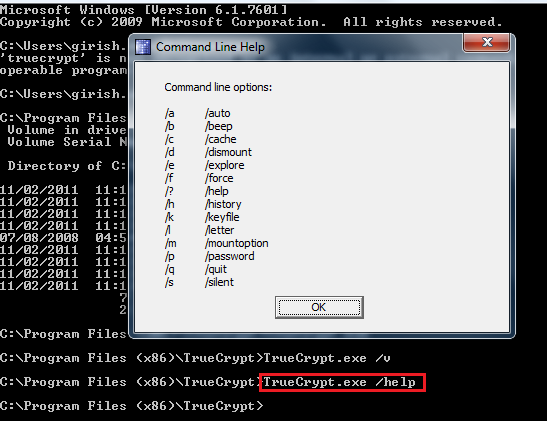
Command line options for TrueCrypt :


Mount TrueCrypt Encrypted Volume using Command :

/l = Drive Letter


TrueCrypt Reference Links

http://www.tateu.net/software/
http://www.autohotkey.com/board/topic/86586-tcbrute-2-truecrypt-bruteforce-password-recovery/
http://dl.securityvision.ch/TCBrute/
http://security.stackexchange.com/questions/30605/brute-forcing-password-to-a-truecrypt-encrypted-file-with-partial-knowledge
 http://truecryptblooz.blogspot.in/2011/09/one-day-i-forgot-my-truecrypt-password.html
https://code.google.com/p/truecrack/
http://www.hacker10.com/other-computing/brute-force-a-truecrypt-volume-with-truecrack/
http://16s.us/software/TCHead/TCHead-0.5/
http://jeffball55.blogspot.in/2011/07/dictionary-attacking-truecrypt.html
http://www.hacker10.com/other-computing/brute-force-a-truecrypt-volume-with-truecrack/
http://unprotect.info/
http://mweissbacher.com/blog/tag/truecrypt/
http://www.truecrypt.org/docs/command-line-usage


Hope you enjoyed, I will post more interesting Information soon!

Regards,
eXpl0i13r


Wednesday, 30 April 2014

Cracking WPS (Wi-Fi Protected Setup) Crack any WPA/WPA2/WEP

WPS is short for Wi-Fi Protected System. Most of the Wireless routers have WPS enabled by default. In WPS cracking attacker will try to brute force WPS Pin which in turn can reveal WPA/WPA2/WEP Network Key in plain text.

1. Reaver is the best tool available to brute force WPS in order to retrieve WPS PIN
2. Using WPS Pin attacker can extract plain text password for WEP/WPA/WPA2 encryptions.


Brute Force WPS Pin using reaver :


Reaver extracting Plain text passwords for WPA PSK:


Some of AP's have rate limiting feature where WPS brute force process will be slowed down.
Reaver still will be successful in cracking WPS pin.


This was short introduction to WPS Cracking, and will add more info soon.

To Be Continued ..

Offensive Security Wireless Professional Certification Review 2014


My OSWP (Offensive Security Wireless Professional) certification journey started on 14th Jan 2014 and it is really nice light weight course from Offensive Security, I really enjoyed this course, However I am Now OSWP :)


Today at Wed 4/30/2014 3:31 PM I got official email from Offensive Security Team :)

About OSWP Certification:
I personally feel that this certification will introduce you to the world of Wireless Hacking.
This course covers up Wireless Basics which slowly goes deep into Wireless Packets and from then moving on towards hacking wireless networks with different encryption's.

Wireless Packet Analysis > WEP Attacks > WPA Attacks > WPA2 Attacks

1. Course will teach you lot of things as how wireless network works,
2. Different encryption's available in wireless communication,
3. Attacking weak encryption access points in various scenarios
4. Hands on with various tools focusing on Aircrack-ng suite.
5. WEP/WPA/WPA2 Encryption / Cracking methodologies.
6. Rouge access points hosting and breaking into wireless network.

Videos covers almost everything mentioned above with practical approach, which will definitely clear your concepts about wireless penetration testing.

What is not covered in OSWP :
1. Enterprise Level Authentication and hacking methodologies.
2. WPS Network cracking.

For which you can refer Vivek Ramchandran's Wifi Security Mega primer series from :
(4.2 GB Free Videos)
http://www.securitytube-training.com/online-courses/securitytube-wi-fi-security-expert/index.html
I really appreciate Vivek Ramchandran's contribution towards wireless security :) Keep it Up!..


My Setup:

1. Real Interest in Learning about Wireless Networks :)
2. Alfa Network Model AWUS036H  (802.11b/g Long Range Wireless USB Adapter)
3. Dlink DIR-615 Wireless Router
4. 9 dBi Antenna
5. Wifi Pineapple Mark V Standard (Optional)

OSWP Certification Exam :

Take a deep breath & Relax!...All offensive security exams are really challenging, and will make you strong with "Try Harder" Approach. It really works...

I can not go much into details about OSWP Exam, but there are number of access points with various encryption's configured and we are supposed to retrieve network key for each of them.
If you have studied and practiced all videos from Offensive Security there are no chances of failing this exam.
Recommend to read material thoroughly solve each and every Lab Exercises which will definitely help you for your ultimate Wifu challenge.
I personally cracked into all given networks within 1 hour time.

OSWP Exam Tips :
1. Study Offensive Security course material, get familiar with Wireless 802.11 Packets.
2. Solve all lab exercises.
3. Go through videos multiple times till you understand attack methodologies completely.
4. Before attacking wireless network read each and every sentence mentioned in Exam Document.
5. Do Not Attack other wireless networks other than specified  by Offensive Team.
6. In case attack won't work go back to material and see if you can get handy information from it :) I am sure you will get it!

When it comes to Wireless Penetration testing assignments, I will trust OSWP Certified!!!

I am Happy to be OSWP Certified !!
Thanks to Offensive Security Team for such a wonderful course.

To Be Continued.....


Saturday, 15 March 2014

Burp Suite SSL Error


While working with Burp Suite, sometimes we get SSL errors as mentioned below,


Above error is because Firefox is not trusting portswigger certificate.
Simple solution is :

1. Configure Firefox to use Burp suite proxy.
2. Visit http://portswigger.net/
3. Click on Technical Details, and add exception.
4. View certificate, Go to Details.
5. Click on Export to export portswigger certificate
6. Go to Tools > Options > Certificates > View Certificate > Import > Select Exported Certificate.
7. Thats It!..

For More Information Refer : http://portswigger.net/burp/tutorials/InstallingCACertificate.html
Now open your Https website and you are good to go!..

Regards,
eXpl0i13r